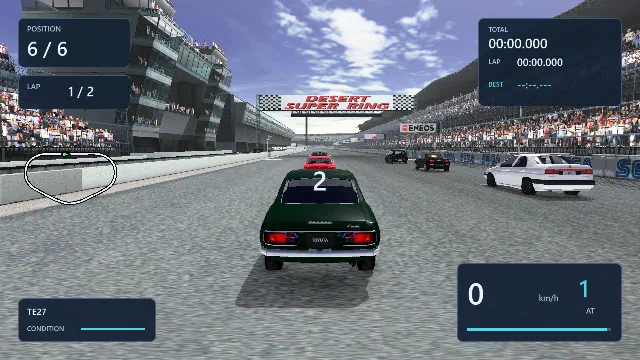
An independent native PC port Xbox → Windows
SEGA GTONLINE.
An Xbox favourite. A new life on PC.
A native Windows port, recovered from the original Xbox game and powered by a custom GPU renderer by Panos Karabelas.
Recovered. Rebuilt. Refined.
The game you remember. A PC version to make it last.
Built by reverse engineering the European Xbox release. Original models, courses, audio and game data meet a native Windows platform and a configurable modern renderer.
The aim is faithful behaviour with room to improve the experience. Every new feature is a choice.
Old roads. New light.
A custom renderer by Panos Karabelas brings the original cars and courses into Direct3D 12 and Vulkan. Lighting, reflections, shadows and post-processing run in GPU graphics and compute shaders, with original scene geometry and textures resident in GPU memory. From clear-coated paint to sunlight through the air, this is a complete native rendering pipeline.
- Physically based materials: GGX shading, layered clear-coated car paint, Fresnel reflections and multiple-scattering energy preservation. PBR adds procedural normal/roughness detail, specular antialiasing and baked-shading reduction; Inferred PBR Materials adds reviewed surface assignments.
- Environment lighting and dynamic reflections: captured diffuse irradiance, filtered specular cubemaps, parallax-corrected indoor reflections and staggered capture/filtering with smooth updates. AMD FidelityFX screen-space reflections add reflected detail from visible geometry.
- Soft, dynamic shadows: cascaded sun shadows with PCSS filtering, GPU screen-space contact shadows and a dedicated 4096×4096 player-car shadow map fitted to the body and wheels.
- Recovered course lighting and projected headlights: original course light banks, beam texture, per-car projector placement and camera offsets, with headlight caster shadows for up to six cars.
- Ground-truth ambient occlusion (GTAO): depth-aware crevice shading, bent normals and temporal reprojection with depth/normal history rejection.
- Screen-space global illumination (SSGI): diffuse light bounce, temporal accumulation and depth/normal reconstruction for light spilling between visible surfaces.
- Volumetric lighting: filtered, shadowed sun shafts during races, including occlusion from the dedicated player-car shadow map.
- Motion blur: depth-aware scene blur, with menus and race readouts drawn afterwards to stay sharp.
- HDR and exposure: linear floating-point scene lighting, HDR display output and automatic percentile-histogram exposure metering with camera-cut resets. Bloom adds soft highlight glow; the optional Gran Turismo 7 tone-mapping curve shapes scene highlights.
- Your settings, your look: every graphics upgrade has an option, with a master Graphics Upgrades switch and a live Ctrl+G comparison that preserves individual choices and display size.
Material-specific surface assignments are reviewed estimates. Screen-space effects use visible scene information. Original artwork is retained; full rendering parity remains in progress.
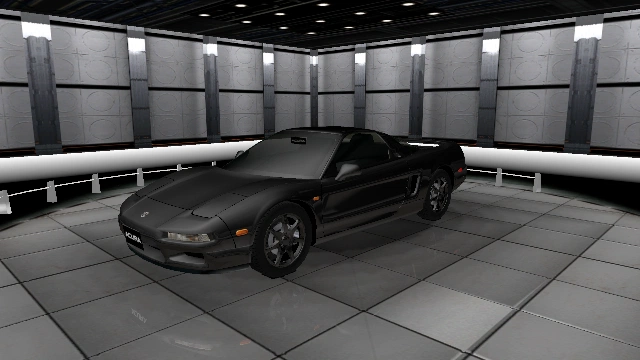
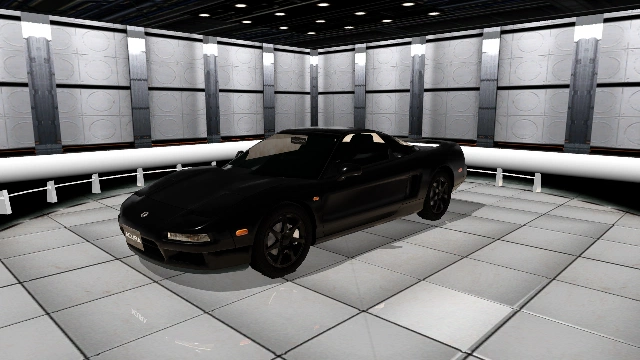
Same scene. One switch.
See what the renderer changes.
Drag the divider, or focus it and use the arrow keys, to compare Graphics Upgrades off and on.
In the showroom
On the starting grid
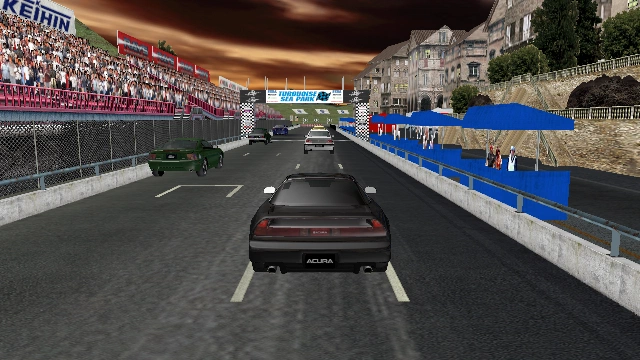
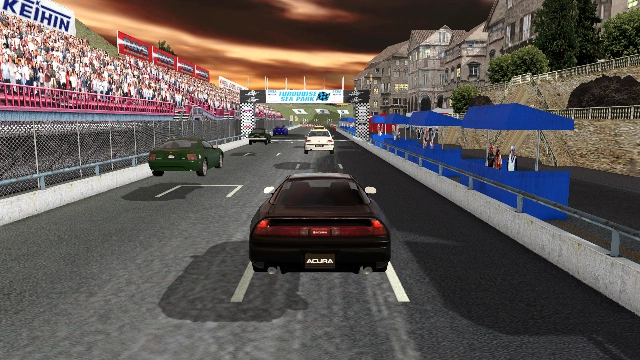
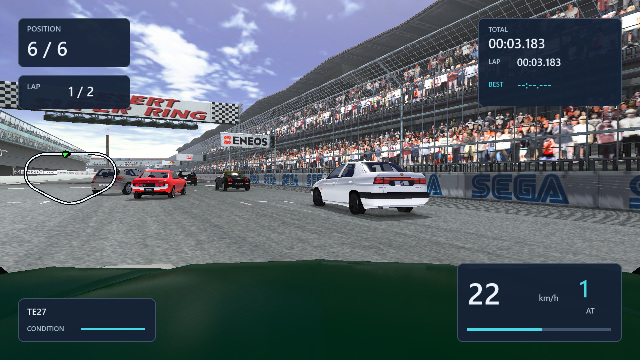
Actual native-renderer captures from hidden-window developer mode. Each pair uses the same camera, geometry, paint and frame sequence; only the Graphics Upgrades master switch changes, matching Ctrl+G. Captured in SDR at 640×360 after a 3× scene render, with temporal upscaling disabled in both. Still images cannot demonstrate motion blur or HDR display output.
Built for the screen in front of you.
Scale the output resolution, choose widescreen presentation and tailor image quality to your hardware. Menus and race readouts are drawn after scene reconstruction.
- 16:9 presentation with aspect-aware cameras and UI placement; 4:3 remains available.
- NVIDIA DLSS / DLAA, AMD FSR (the supported 4.x path on compatible hardware, otherwise 3.1) and Intel XeSS, with quality, balanced, performance and native AA modes.
- 16× anisotropic texture filtering, FXAA and AMD FidelityFX CAS sharpening.
- Scene motion vectors, depth and reactive masks support temporal reconstruction, with history resets at camera cuts.
Temporal upscalers currently require Direct3D 12. DLSS requires an NVIDIA RTX GPU; HDR requires Windows HDR and a compatible display.
A cleaner way to find the next race.
Minimal UI recreates text and interface panels with native Unicode typography, restrained highlights and layouts that respect the screen's aspect ratio. Switch back to the original interface whenever you prefer.
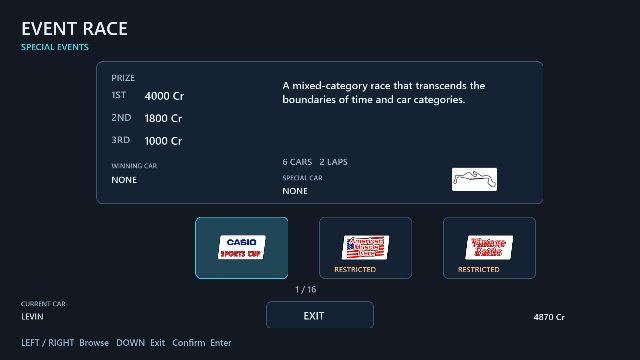
- Rebuilt Event Race navigation with course details, entry restrictions, prizes and transmission selection.
- Readable dialogs, aligned settings columns and a coherent Save/Load card layout.
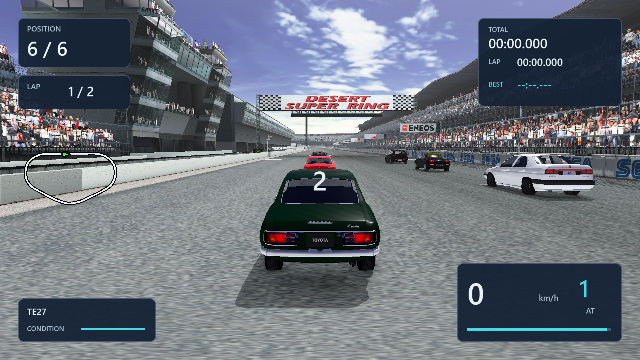
- Live race timing, position and vehicle readouts; original logos, photographs and emblems remain intact.
- Menu layout checks cover both UI styles at 16:9 and 4:3.
Minimal UI is an optional native interface. It does not upscale UI textures with an AI model.
Back in the garage. Back on the grid.
The career's connected again: buy a car, build a garage, enter events, earn rewards and save your progress. Recovered game logic and original assets form the foundation.
- All 19 regular and 19 champion Official Events are connected, along with five progression-unlocking license trials.
- All 29 manufacturers and the original 148-entry shop catalog, with paint selection and purchases.
- Car Parts, Used Parts, installation, tuning, overhaul services, NOS and garage goods.
- Offline Quick Battle, Chronicle, Time Attack and Gathering controllers, plus replay, photo album and GT Garage services.
- Car-specific engine recordings and RPM curves for the player and opponents, alongside road, wind and tire audio.
- Prize scenes with trophies, awards, animated backgrounds, counters and original music.
This is a work in progress. Full race, physics and presentation parity are unfinished. Online multiplayer has not been restored.
A different kind of challenge.
Keep the recovered driving model, or enable an optional, more demanding simulation for the player and AI. Adjust the opponents' difficulty from easy to hard, or retain the event's original progression.
- Per-wheel Pacejka tire simulation, combined grip, load and surface sensitivity, suspension weight transfer, drivetrain, ABS and traction control.
- Wheel inertia, clutch engagement, gear ratios and axle torque split, with automatic shifts based on road speed.
- Five adjustable AI difficulty levels, plus Auto; predictive corner-speed planning and braking in the optional physics mode.
- An optional chassis-mounted hood camera and right-stick camera orbit.
The optional physics mode uses calibrated generic tire coefficients, rather than measured per-car tire datasets. It is disabled by default.
Your wheel. Your pedals. Your way to drive.
A dedicated input system for steering wheels and sim-racing controls, alongside keyboard and gamepads. Mix devices, calibrate their travel and navigate the game from your rig.
- Steering wheels, separate USB pedals, clutch, analog handbrakes, paddles and H-pattern shifters. Each control can come from a different device.
- In-game calibration records full-left/full-right steering and released/pressed pedal travel, including inverted axes and combined pedal axes.
- Wheel-specific deadzone and steering response, with adjustable feedback strength.
- H-pattern direct gear selection in both physics modes, neutral, accelerator-driven reverse and progressive clutch disengagement; paddles use manual transmission.
- Speed-dependent centering, grip-loss and impact feedback through supported SDL haptic wheels. Effects stop on pause, focus loss or disconnect.
- Bind confirm, back, pause and all four menu directions for wheel-only navigation after setup. Device bindings persist, with hot-plugging and keyboard/gamepad fallback.
- DualSense adaptive throttle/brake resistance, grip-loss trigger pulses and engine, shift and impact vibration, plus optional PlayStation prompts.
- Keyboard and gamepad controls remain available alongside the wheel. Open Options / Controls / Wheel, pedals and shifter setup to configure your rig.
Wheel feedback is a basic centering and impact model, not a reconstructed steering rack. Availability and direction depend on the device's SDL driver. Physical wheel and DualSense feel still require hardware testing; DualSense uses SDL rumble and adaptive triggers.
Less friction between you and a drive.
Small conveniences add up. Inspect a car, remember where you left off and keep earlier saves within reach. Each addition has its own setting.
- Garage sorting, favourites and recent-car order; remembered brand, car, paint and garage selections.
- Stock-car comparisons and an optional brand X containing 11 unused cars.
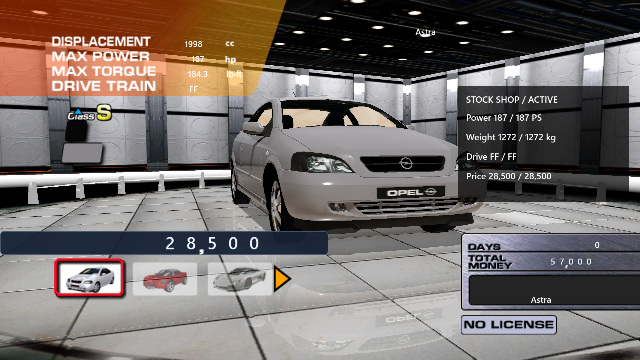
- Showroom rotation, zoom, pause and hide-UI controls; an optional turntable camera.
- Quick race retry, rotating goods previews and automatic UI hiding in car scenes.
- Three previous valid saves per slot, with backup loading from the Save/Load menu.
- A master Graphics Upgrades switch, plus individual effect settings. Ctrl+G temporarily toggles the visual upgrades.
The next lap
A home for the first release.
The port is still in development. A downloadable build will appear here when it is ready.
Public release coming soon
Windows PC · Your own European Xbox disc image required
When the build lands
- 01
Extract the release
Keep the executable and SDL3.dll together in a writable folder.
- 02
Select your disc image
Launch the game and choose your European Sega GT Online ISO. Asset preparation runs automatically on first launch.
- 03
Set it up your way
Choose your graphics and controls. For a wheel, open Options / Controls / Wheel, pedals and shifter setup. Remember to save your career from the game's Save menu.
Development snapshot / 5 October 2026
Preservation is a process.
Career menus, car purchases, manual saves and connected Official Events work. Recovery continues across full race behaviour, physics, collisions and presentation.
The enhanced renderer has GPU checks across Direct3D 12 and Vulkan, including SDR/HDR paths. Menus have been reviewed in both interface styles at 4:3 and 16:9. Wheel checks cover virtual devices, calibration, reconnects and both physics modes; physical hardware feel still needs testing.
Recent work
Wheel simulation and complete input setup
Mixed-device steering, pedals, clutch, analog handbrake, paddles and H-pattern shifting; calibrated axes, configurable feedback, wheel menu bindings and reconnect handling.
Menus, materials and a clearer interface
Event Race reconstruction, Minimal UI, menu alignment fixes, reviewed PBR surfaces and individually configurable graphics effects.
A broader modern lighting pipeline
Recovered course light banks, original headlight projection, filtered dynamic reflections, exposure improvements and detailed player-car shadows.
Before you drive
A few useful answers.
What do I need to play?
A Windows PC, a compatible Direct3D 12 or Vulkan graphics device, and your own European Sega GT Online Xbox disc image (ISO). Performance requirements and supported Windows versions will be documented with the first public build.
Are the original game files included?
The build uses your own European disc image. On first launch, select it in the file picker; the port validates it, copies it beside the executable and prepares the assets automatically. Your source image is left unchanged.
Do I need Python, FFmpeg or an emulator?
No. The native executable bundles its asset-preparation tools and restores the runtime files locally. Players do not need developer tools or an emulator. The release package includes the executable and SDL3.dll.
Can I keep the original look?
Yes. Minimal UI, widescreen and the rendering upgrades are configurable. The Graphics Upgrades master switch bypasses the enhanced lighting pipeline while keeping your individual choices. Some display settings require a restart.
How do saves work?
Career progress uses manual saves in a versioned PC format, stored locally under userdata. There is no autosave. Signed Sega GT Online Xbox saves are not compatible; the separate Sega GT 2002 import feature authenticates an old-title save using your own signing keys.
Does Online mean online multiplayer works?
Sega GT Online is the original game's title. Restored online multiplayer is not currently available. This page describes the native renderer and the connected offline game features.
Is this an official release?
This is an independent, unofficial native port by Panos Karabelas. Sega GT Online and its original artwork belong to their respective owners. The project is not affiliated with or endorsed by SEGA.
Help improve the port
Found a bug?
Tell me what happened in Sega GT Online, what you expected, and how to reproduce it.
Your email is optional and lets me reply.